SOCPilot: An AI SOC Co-pilot That Talks to 22 Security Tools — And You Can Run It in 60 Seconds
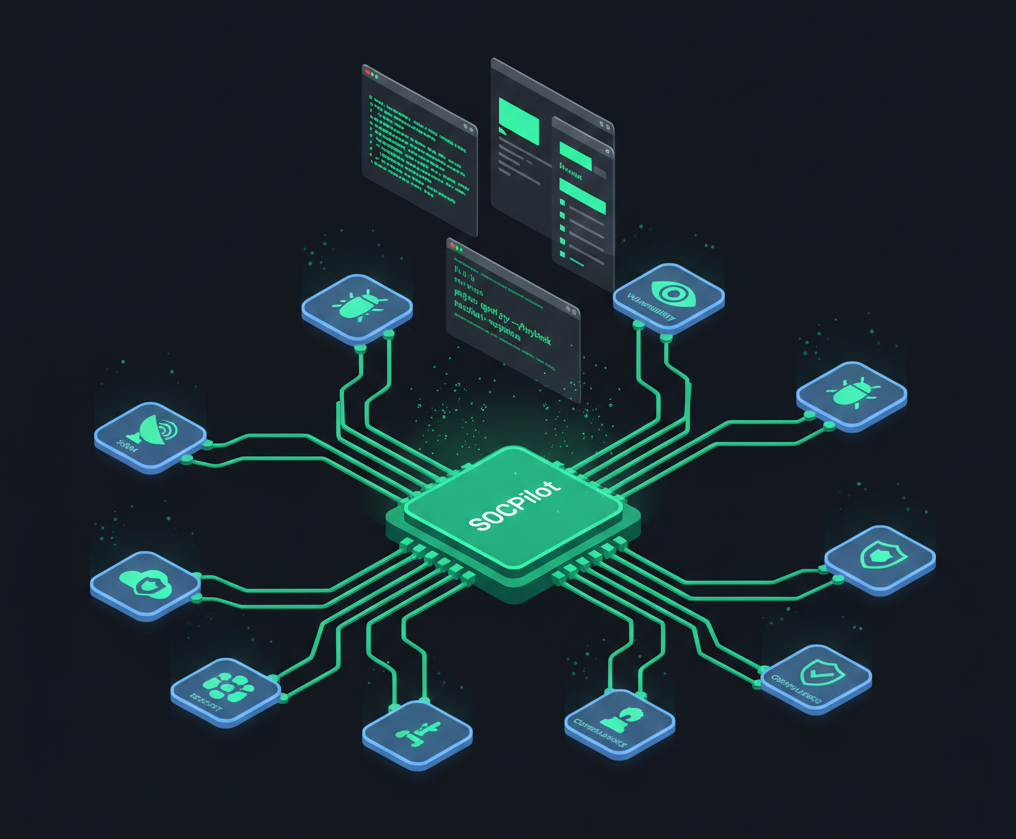
You've got Sentinel for logs. GreyNoise for IP rep. GHAS for code findings. Prowler for cloud posture. Okta for identity. Vault for secrets. Jira for tickets. Slack for "hey did anyone see this alert." Ten dashboards. Ten query languages. One analyst alt-tabbing through all of them like a DJ mixing tracks — except nobody's dancing and the alert queue keeps growing. So I built the thing that connects them all.
I've spent this blog series building pipelines that catch bad code before it ships — Gitleaks, Semgrep, Trivy, ZAP in CI/CD, GHAS as a hard security gate, and DefectDojo as the single pane of glass. But there was still a bottleneck I hadn't solved: the human is the integration bus. An analyst spots a Dependabot critical, pivots to GreyNoise to check exploitation status, cross-references OpenCTI for threat actor context, swivels to Okta for session data, then manually types a Jira ticket and drops a Slack update. That's not orchestration. That's a biological SOAR with a coffee dependency.
SOCPilot is the answer to that. It's an open-source AI security operations agent that wires 22 security tools into one investigation interface — CLI, HTTP API, or a browser-based chat UI — using MCP (Model Context Protocol) as the glue. Every MCP tool call stays inside your network. Only AI inference crosses the boundary. And you can test the whole thing in mock mode without a single API key.
Repo: github.com/Parthasarathi7722/mcp-security-ops-suit
What Changed: From Config Repo to Full Application
The first version of this project was a collection of MCP configs, playbook prompts, and architecture diagrams. Useful for reference — but you still had to wire everything yourself. SOCPilot v1.0 is a complete application:
| What | Before | Now |
|---|---|---|
| Interface | Config files only | CLI + HTTP API + Browser chat UI |
| Investigation | Copy-paste prompts | Multi-turn sessions with history |
| Tool setup | Manual .env editing | Interactive onboarding wizard |
| Deployment | "Figure it out" | Docker one-liner with private subnet |
| Testing | Need all API keys | Mock mode — zero credentials |
| Streaming | N/A | Real-time SSE + WebSocket |
| SIEM integration | Manual | Webhook auto-triggers playbooks |
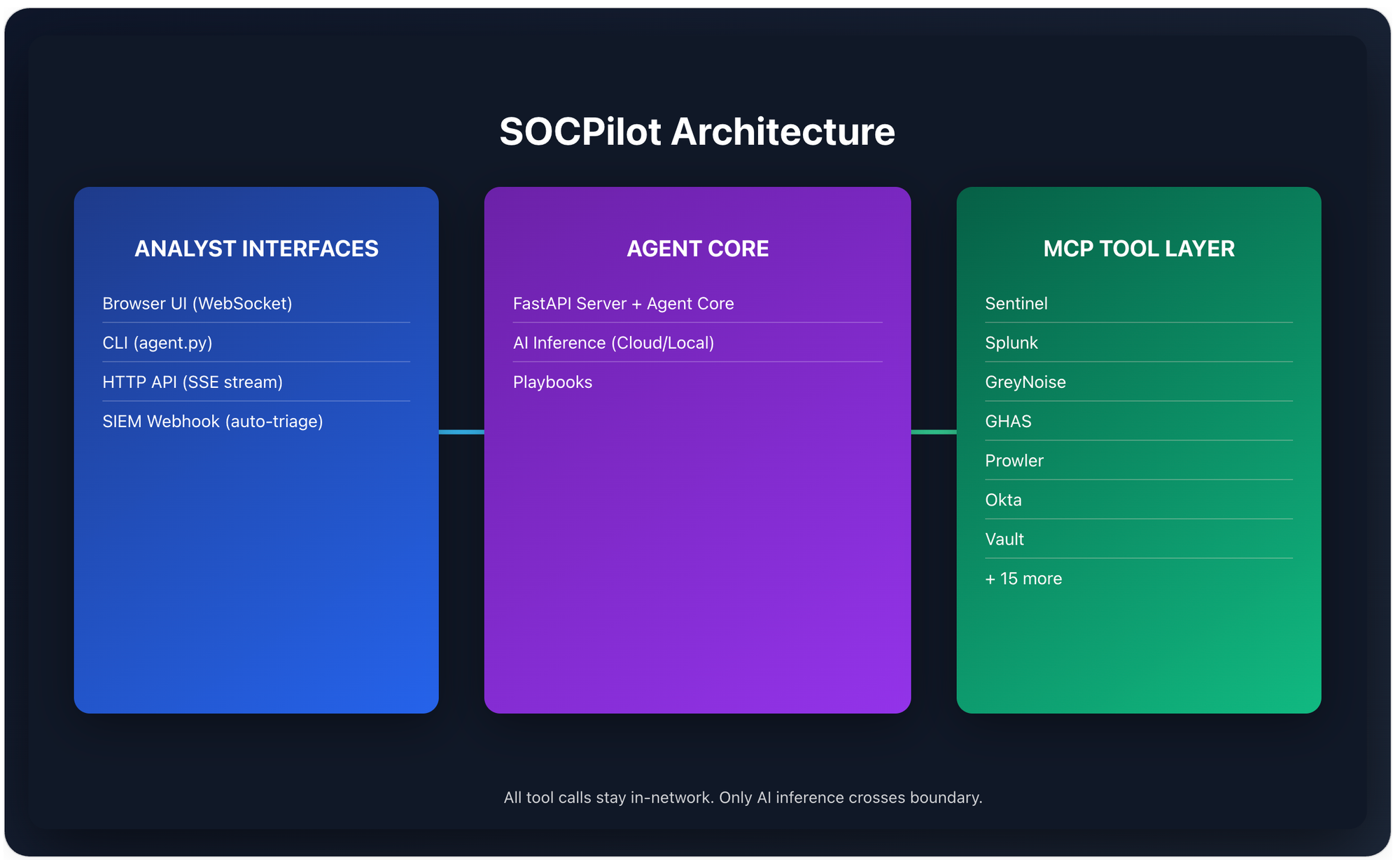
The architecture is simple: your query comes in via any interface, the agent calls your AI provider (Anthropic or local LLM), the AI reasons about which tools to call, all tools in a single turn execute in parallel via asyncio.gather(), results feed back for further reasoning, and the final analysis streams back token-by-token.
The Browser UI: A SOC Chat Interface
The biggest addition is the browser-based investigation interface that gives you everything in one window:
Chat area — real-time streaming via WebSocket with markdown rendering, syntax-highlighted code blocks, and collapsible tool call cards that show exactly what each MCP tool was asked and what it returned.
Playbook sidebar — one-click launchers for all six SOC playbooks (incident response, threat hunting, vulnerability triage, compliance audit, secret leak response, cloud posture review). Select a playbook, type a target, and watch the investigation stream in real-time.
Tool call inspection — every MCP invocation shows up as an expandable card. You can see the exact JSON input sent to each tool and the full response. No black boxes.
Start the UI with:
uvicorn server:app --host 0.0.0.0 --port 8000
# Open http://localhost:8000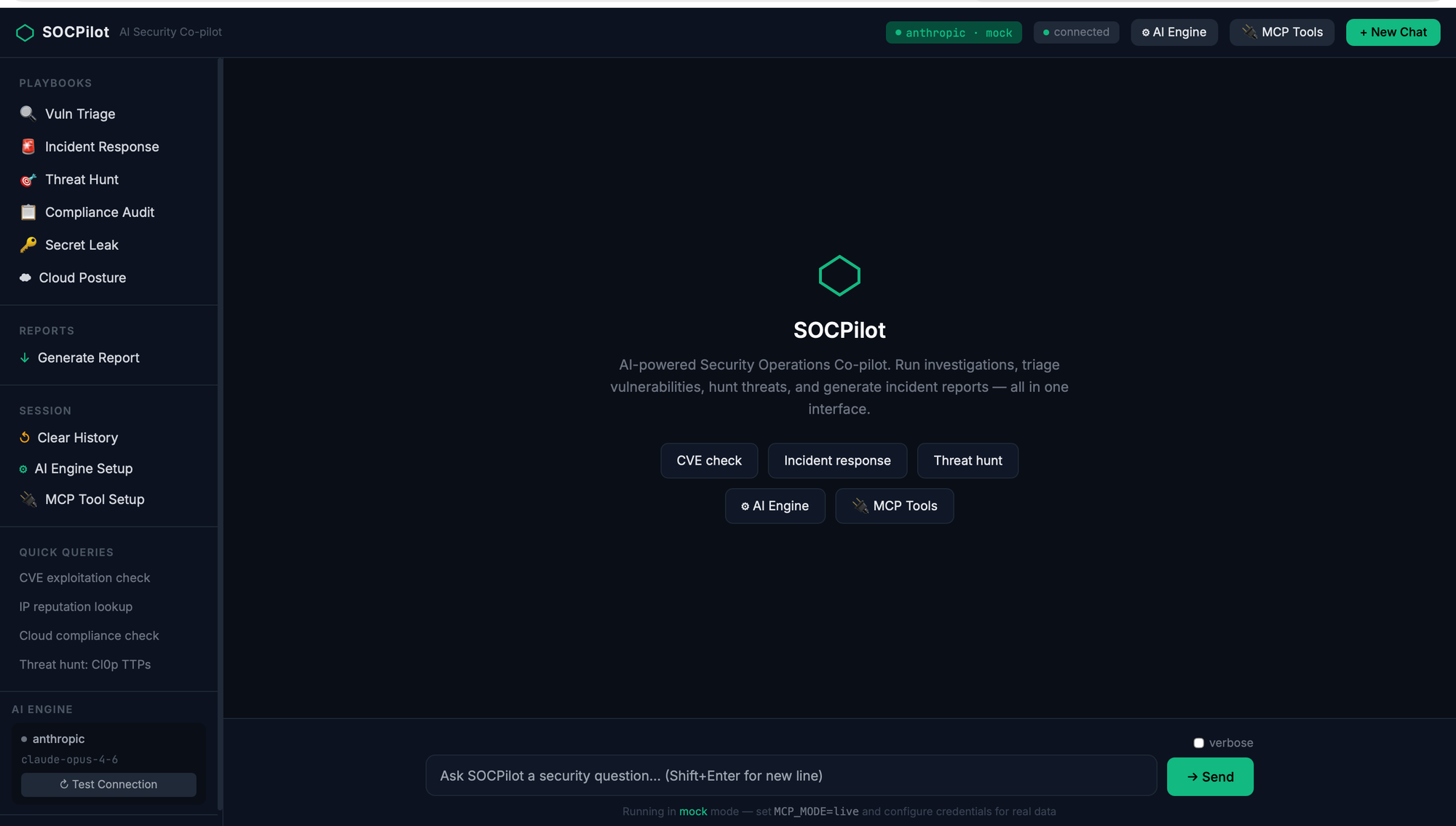
Onboarding: From Zero to Investigating in 3 Steps
Now there's an interactive wizard — both in the terminal and in the browser UI to Guide you through the journey.
LLM Setup Wizard
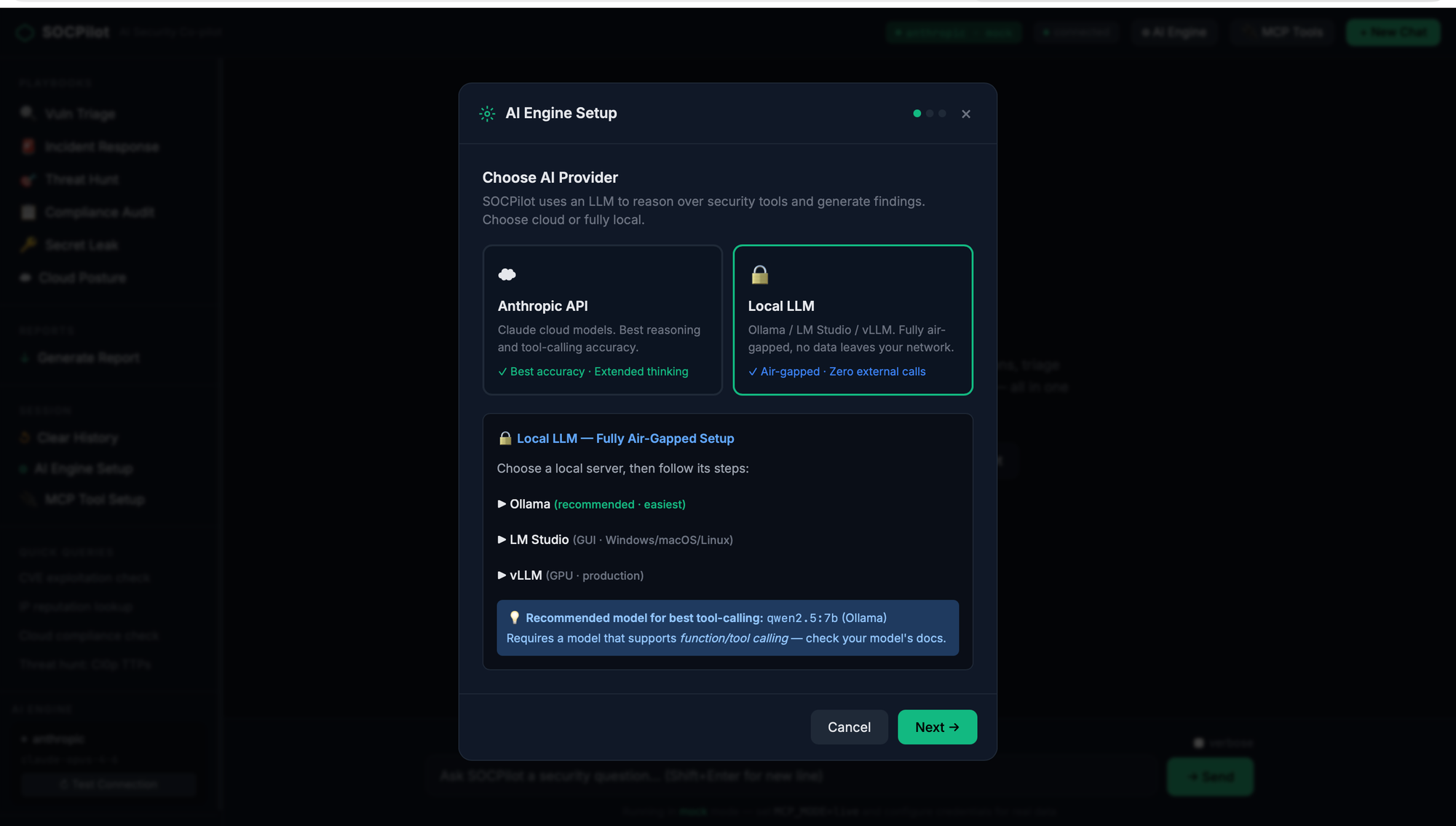
The browser UI includes a three-step AI engine configuration wizard:
Step 1 — Choose your provider: Anthropic for cloud inference, or point to a local LLM running on Ollama, LM Studio, or vLLM. Private-subnet teams can keep everything on-prem.
Step 2 — Enter credentials: API key input with a live connection test. The wizard hits /health/llm to verify connectivity before you proceed.
Step 3 — Confirm and apply: Summary of your configuration with auto-generated environment variables.
MCP Tool Onboarding Wizard
This is where it gets interesting. The tool onboarding wizard lets you configure which security tools SOCPilot connects to, with four deployment tiers:
| Tier | Tools | Cost |
|---|---|---|
| Solo Analyst | GHAS, Semgrep, GreyNoise, Security Detections | Free |
| Team SOC | Solo + Sentinel/Splunk, Snyk, Trivy, Prowler, Vault, Jira, Slack | Varies |
| Enterprise | All 22 tools | Enterprise licensing |
| Custom | Pick exactly what you need | — |
Each tier auto-selects the right tools. Custom mode lets you pick individually from 10 categories. For each tool you select, the wizard prompts for credentials with hints about where to find them, validates inputs, and generates a clean .env file.
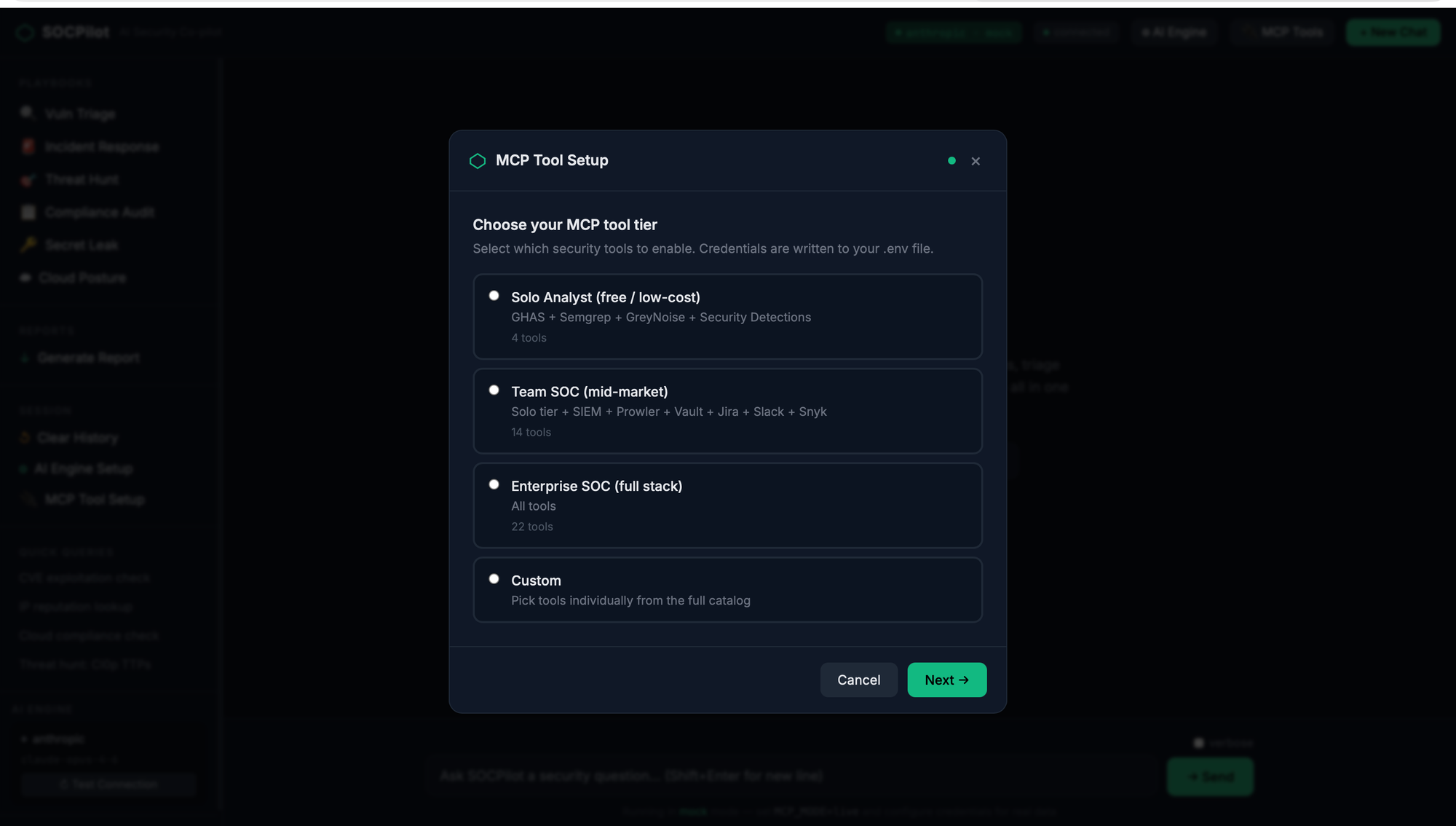
The CLI version works the same way:
bash
python onboard.py              # Full interactive wizard
python onboard.py --check      # Verify existing config
python onboard.py --add trivy  # Add a single tool
python onboard.py --list       # Show all available tools
Three Ways to Investigate
1. CLI — For the Terminal-Native
bash
# One-shot query
python agent.py "Is CVE-2024-50623 actively exploited?"

# Named playbook with target
python agent.py --playbook incident-response "alert SEC-7721"

# Verbose mode to see AI reasoning
python agent.py --verbose "hunt for T1190 exploitation across last 90 days"

# Save report to file
python agent.py --output report.md --playbook compliance-audit "AWS prod account"

# Interactive multi-turn session
python agent.py
2. HTTP API — For Integration
The FastAPI server exposes SSE-streaming endpoints that any tool can consume:
bash
# Free-form investigation (streams via SSE)
curl -X POST http://localhost:8000/query \
  -H "Content-Type: application/json" \
  -d '{"query": "Check GreyNoise for IP 185.220.101.34"}'

# Named playbook (streams via SSE)
curl -X POST http://localhost:8000/playbook \
  -d '{"playbook": "vuln-triage", "target": "CVE-2024-50623"}'

# Sync report generation (saves to file)
curl -X POST http://localhost:8000/report \
  -d '{"playbook": "compliance-audit", "target": "AWS prod", "filename": "audit.md"}'
Full Swagger docs at http://localhost:8000/docs.
3. SIEM Webhook — For Automated Triage
Point your SIEM's alert webhook at SOCPilot and it auto-triggers incident response:
bash
# Sentinel/Splunk/Elastic/Datadog → SOCPilot
POST http://localhost:8000/webhook/siem
Content-Type: application/json

{
  "alert_id": "SEC-7721",
  "description": "Impossible travel: admin@company.com",
  "severity": "high"
}
The webhook maps alert severity to playbooks and streams the investigation. Your analysts wake up to context, not raw alerts.
22 Tools, 10 Categories
SOCPilot connects to the security tools you already run:
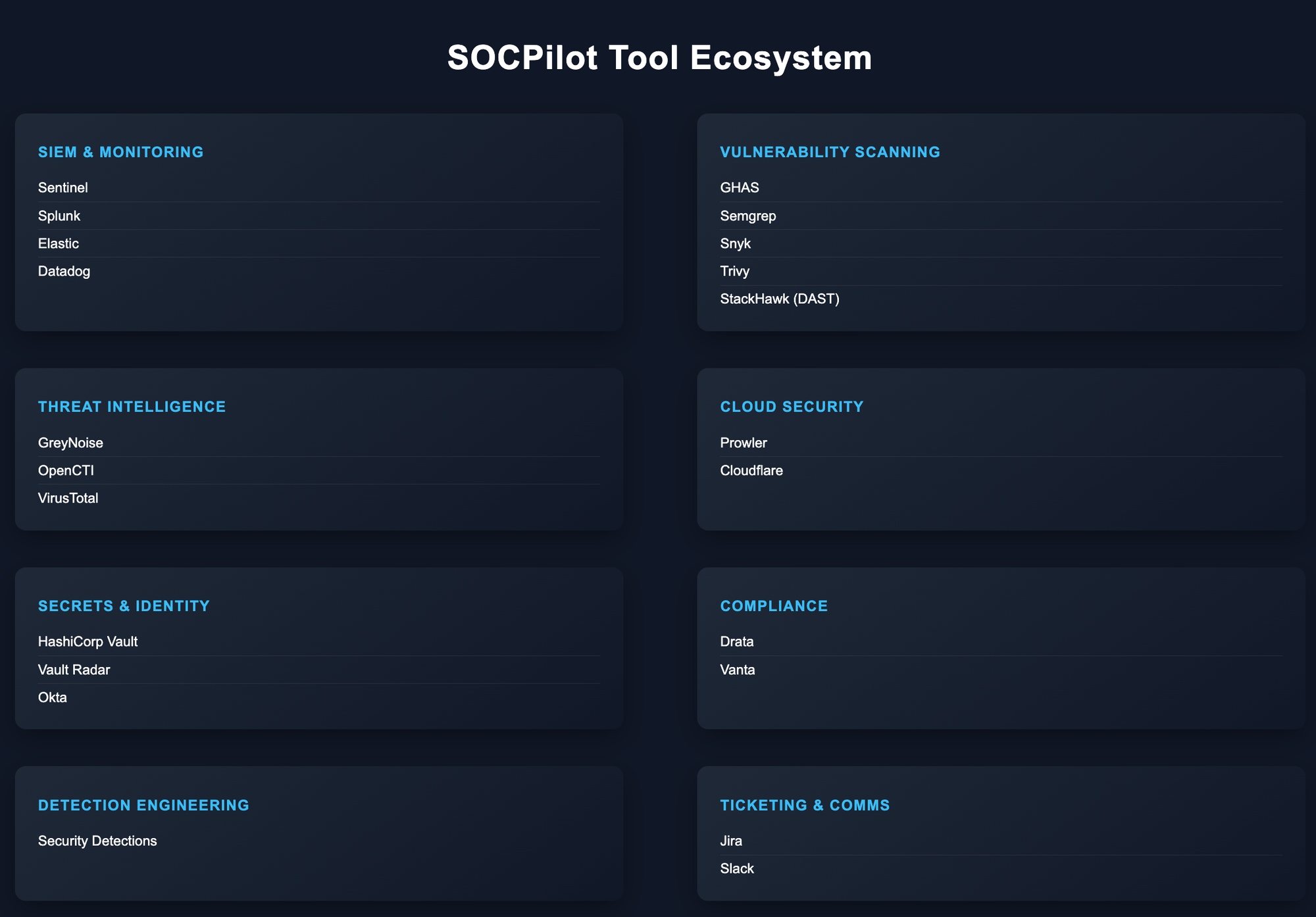
Each tool runs as an MCP subprocess communicating via stdio JSON-RPC — both npx-based (Node) and uvx-based (Python) servers are supported. Tools execute in parallel within a single investigation turn.
Mock Mode: Test Everything Without Credentials
This was the most requested feature. Run python agent.py "any query" without configuring a single tool credential — mock mode returns realistic sample data so you can see exactly how SOCPilot orchestrates investigations before committing to live setup.
bash
git clone https://github.com/Parthasarathi7722/mcp-security-ops-suit.git
cd mcp-security-ops-suit
python3 -m venv .venv && source .venv/bin/activate
pip install -r requirements.txt
export AI_API_KEY=<your-anthropic-key>
python agent.py "Is CVE-2024-50623 actively exploited?"
That's it. Sixty seconds from git clone to your first AI-orchestrated security investigation. The mock responses are realistic enough to demonstrate the full workflow to your team before anyone touches a production API key.
Six SOC Playbooks
Every playbook is a structured investigation workflow that the AI follows step-by-step, calling the right tools in the right order:
Vulnerability Triage — Pull CVE details from GHAS/Snyk, check exploitation status on GreyNoise, correlate with OpenCTI threat intel, assess reachability, and produce a prioritised verdict with a Jira ticket.
Incident Response — Given a SIEM alert, pull full event details, enrich IPs and identities, check threat intel, review access patterns in Okta, and present containment recommendations for human approval.
Threat Hunting — Search detection rule databases for MITRE ATT&CK TTPs, translate to your SIEM's query language, run hunts, enrich results, and produce a prioritised findings report.
Secret Leak Response — Trace exposure scope, determine blast radius, coordinate rotation via Vault, check audit logs for misuse, and generate an incident ticket.
Cloud Posture Review — Run Prowler checks, compare with previous results, correlate with WAF events, identify regressions, and highlight quick wins.
Compliance Audit — Aggregate findings from Prowler (cloud), GHAS (code), and Drata/Vanta (framework), cross-reference against controls, and produce a gap report.
Deploy It
Local Development
bash
python3 -m venv .venv && source .venv/bin/activate
pip install -r requirements.txt
python onboard.py
source .env
uvicorn server:app --host 0.0.0.0 --port 8000
Docker (Private Subnet)
bash
python onboard.py
docker compose up -d
curl http://localhost:8000/health
The Docker image bundles Python 3.12, Node 20, and uv in a non-root container. All MCP subprocesses run inside the container's network — tool calls never leave your infrastructure.
Security Considerations
Connecting AI to security tools is powerful. It's also a risk surface:
Private-subnet architecture — All MCP tool calls stay within the network. Only AI inference requests cross the boundary. For fully air-gapped environments, point the LLM at a local Ollama/vLLM instance and nothing leaves.
Least privilege — Each MCP server gets its own scoped token. Sentinel gets read-only Log Analytics access. Vault gets a policy scoped to specific secret paths. Okta gets read-only unless you explicitly need session management.
Human-in-the-loop — The AI presents containment plans and recommendations. It does not execute destructive actions automatically. Analysts review and approve.
Audit trail — Every tool invocation, every query, every response is logged. The tool call inspection cards in the UI make this transparent in real-time.
Prompt injection awareness — MCP data is untrusted input. A crafted alert description could contain injection payloads. SOCPilot treats AI output as advisory, not authoritative.
How This Fits the Ecosystem
SOCPilot is the orchestration layer that ties together everything we've built across this series:
┌──────────────────────────────────────────────────────────────────┐
│                     FULL SECURITY STACK                           │
│                                                                   │
│  CODE SECURITY              INFRA SECURITY                        │
│  ┌────────────────┐         ┌──────────────────────────┐         │
│  │ DevSecOps      │         │ Cloud Security Checklists │         │
│  │ Pipeline       │         │ IAM, S3, EC2, Lambda,    │         │
│  │ (Gitleaks,     │         │ ECS, EKS, VPC, Secrets,  │         │
│  │  Semgrep,      │         │ Prowler, Checkov, Trivy  │         │
│  │  Trivy, ZAP)   │         └──────────┬───────────────┘         │
│  └───────┬────────┘                    │                          │
│          └──────────┬──────────────────┘                          │
│                     ▼                                             │
│           ┌─────────────────┐                                     │
│           │ DefectDojo      │ ← All findings aggregated           │
│           └────────┬────────┘                                     │
│                    ▼                                              │
│           ┌─────────────────┐                                     │
│           │ SOCPilot        │ ← AI-powered investigation          │
│           │ CLI + API + UI  │    22 tools, 6 playbooks            │
│           └─────────────────┘                                     │
└──────────────────────────────────────────────────────────────────┘
The pipeline secures the code. The checklists secure the infrastructure. Prowler audits the cloud posture. Findings flow into DefectDojo for tracking. And SOCPilot ties it all together — one interface to investigate, correlate, and respond across your entire security stack.
No $50K SOAR platform. No vendor lock-in. Just MCP, open-source tools, and an AI that actually does the legwork.
Resources
Repo: github.com/Parthasarathi7722/mcp-security-ops-suit — Full source, Docker deployment, mock mode
MCP ecosystem:
- MCP Specification — The protocol standard
- MCP Server Registry — Official registry
- PulseMCP Directory — 8,000+ community MCP servers
- OWASP MCP Top 10 — Security risks in MCP
Chaos to Control ecosystem:
- DevSecOps Pipeline — CI/CD security gates
- Cloud Security Checklists — AWS hardening by service
- IAM Least Privilege Toolkit — Automated IAM right-sizing
- AWS Security Notification System — Real-time Slack alerts